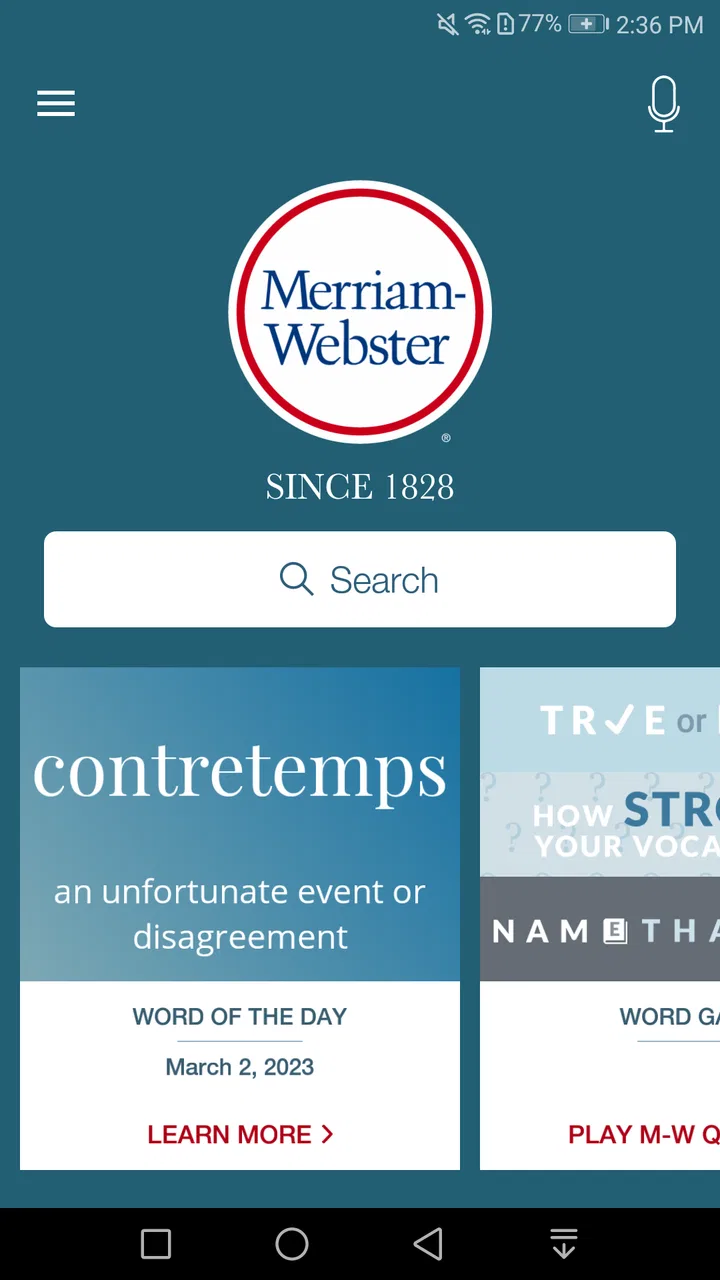
Dictionary - Merriam-Webster
- 3.7
- Rating
- 50.00M
- Installs
- Free
- Price

 Analysis by App-foxy
I use a dictionary most often when I am already writing, not when I am studying vocabulary from a textbook. I want a quick answer to a small but important question: Is this the right word, what does it actually mean, and how would a natural sentence use it? Dictionary - Merriam-Webster is built for that moment. It is a free Books & Reference app from Merriam-Webster Inc., and its long presence on mobile helps explain why it remains a familiar choice for checking English.
My experience with it is best summed up this way: it is more useful than a basic word-search tool, but it is not a complete replacement for every kind of language app. It works especially well when I need a dependable reference during reading, writing, schoolwork, or casual curiosity. At the same time, the app can feel less focused if I only want a very fast definition and do not care about the extra learning material around it.
How the current app fits into everyday English reference
The app has been available since June 24, 2011, which gives it a more established feel than many newer dictionary utilities. The current version is 5.6.0, and it supports devices running Android 6.0 or later. That compatibility makes it accessible to people using older phones, although users with very dated hardware may still notice that any modern reference app feels less immediate than it does on a recent device.
You May Also Like

 Pandora - Music & Podcasts
Pandora’s Music Is Easy to Start, but Harder to Recover
Pandora’s strength is its low-effort path from a seed to a station. Its weak spot is how much confidence it asks you to place in connection, setup, and quiet recovery.

 8 Ball Pool
8 Ball Pool Is Built on Rivalries, Rematches, and Routine
A close look at the rivalries, rematches, shared routines, and unanswered safety questions that turn a quick pool match into a persistent mobile community.

 Samsung Music
Samsung Music’s Quiet Strength Is Playing What You Already Own
Its reach comes less from spectacle than from dependable access to a personal library. That simplicity is both the app’s strongest retention engine and its ceiling.

 AccuWeather: Weather Radar
AccuWeather Review: A Quick, Clear Forecast for Everyday Decisions
For everyday plans, the best forecast is the one you can understand quickly. AccuWeather makes rain timing, radar, and local conditions easy to act on, with a few trade-offs.

 Hill Climb Racing
Why Hill Climb Racing Still Turns Crashes Into One More Run
A tiny car, a bumpy hill and one more upgrade: Hill Climb Racing keeps resurfacing because its simple chaos makes every near-miss feel personal.

 AliExpress - Shopping App
AliExpress Makes Global Shopping Feel Personal, but Shoppers Bear the Risk
AliExpress turns a global marketplace into a pocket-sized discovery engine. Its reach is useful, its shopping loop compelling, and its trade-offs easy to miss.
More From Our News Desk
View All News


Its central job is straightforward: look up English words and use the results to understand them more precisely. In practice, I found the value comes from the context surrounding a definition. A short meaning can tell me what a word refers to, but examples, pronunciation guidance, and related information help me decide whether the word belongs in my sentence. That distinction matters when two words appear similar but carry different tones or grammatical uses.
The app is aimed at everyone rather than a narrow academic audience. I can imagine a student using it beside a reading assignment, a learner checking a word in a news article, or a native speaker settling an argument about usage. It is also suitable for writers who want to avoid relying on vague memory. The strongest reason to keep it installed is not vocabulary discovery alone, but the ability to verify a word before using it.
Its reach is substantial: the app has passed 50 million installs and has received around 526 thousand ratings, with an average of 3.7. Those figures suggest a widely used reference rather than a niche tool, but they also tell me not to treat popularity as proof that every user will enjoy the interface. A dictionary is intensely personal; some people prefer a clean search box, while others appreciate extra word information and daily learning elements.
What I do when I need an answer quickly
My usual workflow is to open the search field, enter the word as I remember it, and then read beyond the first line. I check the part of speech before copying a definition into my notes because a word can change meaning depending on whether it functions as a noun, verb, adjective, or another grammatical form. This small habit prevents one of the most common dictionary mistakes: choosing a definition that is technically related but wrong for the sentence.
I also pay attention to pronunciation when I am unsure whether I have heard a word correctly. This is useful with names of concepts, formal vocabulary, and words encountered in podcasts or lectures. A written spelling can look obvious while sounding completely different from what I expected. Having pronunciation information beside the meaning makes the lookup more practical than searching a general web page and sorting through unrelated results.
Another useful routine is to search a word before deciding whether it sounds too formal. Definitions alone do not always reveal register. When the entry includes examples or related usage information, I can make a better judgement about whether the word belongs in an email, an essay, a conversation, or a creative piece. I still read the whole entry rather than assuming the first meaning is the only one.
Why the reference material feels different from a quick web search
A normal web search often gives me a mixture of dictionary pages, discussion threads, advertisements, and pages that use the word without explaining it. The Merriam-Webster app keeps the task centered on the entry itself. That reduces the temptation to accept the first casual explanation I see, especially when I am checking a word with multiple meanings.
Compared with a simple offline word list, it offers a more editorially shaped experience. A basic dictionary app may be faster for a single definition, but it often leaves me to guess pronunciation, usage, or the relationship between meanings. Here, the surrounding entry encourages a slower and more accurate lookup. That is a benefit for writing and study, although it can feel like extra reading when I am in a hurry.
Compared with translation apps, it serves a different purpose. Translation tools are better when I am moving between languages or trying to understand a phrase in another language. This app is more useful when I already have English and need to understand its exact shade of meaning. I would not choose it as my main tool for translating a message, but I would use it to refine the English after a translation gives me a candidate word.
Small workflows that make the app more valuable
One practical technique is to use the app while editing rather than only while drafting. I write a sentence first, mark the word that feels uncertain, and then check whether its definition matches the role I gave it. If the word is too broad, too formal, or belongs to another part of speech, I replace it. This turns the dictionary into an editing checkpoint instead of a passive reference.
For reading, I prefer checking a word after finishing the paragraph rather than interrupting every sentence. I make a mental note of unfamiliar terms, continue reading for context, and then look them up together. The context often narrows the likely meaning before I even open the entry. This approach is especially helpful with words that have several definitions because I can compare the dictionary result with the way the author used it.
For learners, I recommend writing a short personal example immediately after a lookup. A definition can be forgotten quickly, while a sentence connected to your own work or daily life gives the word a practical anchor. The app supplies the reference; I supply the memory hook. That combination is more effective than repeatedly opening the same entry without trying to use the word.
Writers can also use it to challenge familiar words. I sometimes search a word I think I know perfectly and discover an additional sense or a grammatical detail that changes my sentence. This is not about replacing every ordinary word with something impressive. It is about checking whether the word says exactly what I intend, which usually leads to clearer writing rather than more complicated writing.
What has changed, who benefits, and where it still falls short
I’d use this section to look beyond the familiar dictionary task and consider how the app’s current mix of reference and learning material fits different routines. Its free starting point makes it easy to try, while optional purchases and a less-than-universal user response are reasons to judge the experience for yourself. That balance becomes especially relevant when one phone serves several people.
The current balance between reference and learning
The app’s identity sits between a traditional dictionary and a lightweight vocabulary companion. That balance is useful for people who want more than a bare definition but do not want a full course with lessons, streaks, or a structured curriculum. I can open it for one word and leave immediately, or spend longer exploring connected meanings and usage.
That flexibility also creates the main trade-off. If I want only a minimal result, additional material can make the experience feel less direct than a stripped-down dictionary. If I want a complete learning program, the app does not replace a dedicated language course. Its best position is in the middle: a reference I can consult repeatedly, with enough supporting material to improve my judgement over time.
The developer is Merriam-Webster Inc., a name closely associated with English reference publishing. That background matters because the app feels designed around definitions and usage rather than around social sharing or entertainment. Its purpose is clear, and I appreciate that clarity when I am trying to resolve a language question instead of browse a feed.
How existing users may experience the current version
For someone who has used the app for years, the move to version 5.6.0 is best understood as part of ongoing maintenance and product evolution rather than a reason to expect a completely different category of tool. The app remains recognizable as a mobile dictionary: search is central, entries are the destination, and the supporting material exists to make those entries more useful.
I would not install an update expecting it to transform the app into a writing assistant or a translation platform. Its continuing strength is consistency of purpose. Existing users who already like consulting Merriam-Webster on a phone should find the current release aligned with that habit. New users, meanwhile, should judge it by the quality of its lookup experience rather than by expectations borrowed from other language apps.
The average rating of 3.7 shows a mixed but broadly active response from its audience. It has around 39 thousand reviews, so there is clearly a large range of user experiences behind that number. I read the rating as a warning to keep expectations realistic: the reference content may be useful while the overall mobile experience still may not suit everyone. A good dictionary entry cannot fully compensate for interface friction if I need answers several times an hour.
Where I notice friction
The first limitation is that a dictionary is only as helpful as the way I use it. It can explain a word, but it cannot automatically know what I meant in my sentence or decide which tone fits my audience. I still need to compare the entry with the surrounding paragraph and make the final choice. Users expecting automatic rewriting or complete grammar correction may find the app too passive.
The second limitation is the difference between reference and memorization. Looking up a word does not guarantee that I will remember it tomorrow. The app can support learning, but I need a separate habit—writing examples, reviewing notes, or using the word in conversation—to turn a lookup into lasting knowledge. Someone seeking a structured daily course may be happier with an education-focused app.
There is also a financial detail worth noticing. The app is free to install, while in-app purchases range from $1.99 to $9.99 per item. That means I can begin without paying, but I should review any optional purchase screen carefully before committing. For occasional lookups, the free starting point is appealing. For users who want every extra convenience, the total experience may depend on which optional items they choose.
Because the content rating is Everyone, the app is suitable for a broad audience, including families and younger students. Even so, younger learners may need help interpreting formal definitions and examples. A dictionary can present accurate language without explaining whether a word is polite, old-fashioned, technical, or unsuitable for a particular social situation. Adult guidance is still useful when the app is used for schoolwork or independent reading.
Who should choose it, and who should look elsewhere
I recommend it to students who need a dependable English reference beside their assignments, readers who regularly meet unfamiliar vocabulary, and writers who care about exact word choice. It is also a good fit for people who prefer checking an established dictionary entry instead of piecing together an answer from general search results.
I would steer away from it as a primary choice for someone whose main goal is bilingual translation. A translation app will usually provide a more direct path between languages. I would also suggest a dedicated pronunciation or speaking app to someone focused mainly on conversation practice. For memorizing vocabulary through a fixed syllabus, flashcards or a structured course may produce a clearer routine.
People who dislike optional extras or want an extremely plain interface should try the free experience before deciding whether it belongs in their daily toolkit. The app’s broader reference approach is valuable when I want context, but unnecessary when I only need a one-line synonym. That distinction is the most important purchasing judgement, especially because optional in-app purchases are available.
What I would watch as the app continues to evolve
The most meaningful future improvement would be smoother movement between a fast lookup and a deeper study session. I want to search instantly when I am reading, but I also want a clear way to return to useful words later without turning every lookup into a project. Any change that preserves speed while making personal review more practical would strengthen the app without changing its identity.
I would also watch how the current version handles the balance between editorial depth and mobile simplicity. Merriam-Webster’s value comes from trustworthy reference material, yet phone users often consult a dictionary with one hand and limited patience. The best evolution would keep the richness of an established dictionary while making the first useful answer easier to reach.
Finally, I would pay attention to how optional purchases affect the free experience. A free dictionary is most useful when a casual user can complete an ordinary lookup without feeling pushed away from the core reference function. The app already has a broad audience, so maintaining a clear boundary between essential searching and paid extras would help preserve that accessibility.
My recommendation after regular use
Dictionary - Merriam-Webster is a solid choice when I want an English reference that helps me understand not just what a word means, but how carefully to use it. Its free entry point, broad age suitability, and support for older Android devices make it easy to try. The app is particularly worthwhile for reading and writing workflows where precision matters more than flashy study mechanics.
I would not call it the perfect tool for every language task. It does not replace translation software, a pronunciation coach, a grammar checker, or a full vocabulary course. Its optional purchases also mean that users should decide whether the additional experience is worth paying for. Still, those limits are easier to accept once I use it for what it does best: checking English with enough surrounding detail to make a better decision.
My final advice is to install it if you regularly pause over word choice, read demanding English, or want a reliable reference within reach. Start with simple lookups, read the examples instead of stopping at the first definition, and create your own sentence when a word matters. Used that way, this app becomes more than a digital dictionary; it becomes a quiet editing and learning companion that earns its place through repeated, practical use.
FAQs for Dictionary - Merriam-Webster
01What features does the Merriam-Webster Dictionary app offer?
The Merriam-Webster Dictionary app provides a comprehensive range of features including voice search, word of the day, thesaurus, example sentences, audio pronunciations, and word games. It also offers offline access, making it convenient for users without an internet connection. The app is designed to enhance vocabulary and language skills effectively.
02Is the Merriam-Webster Dictionary app free to use?
The app is free to download and use, offering a wide array of features at no cost. However, there is a premium version available that removes ads and offers additional features. Users can choose between the free version with ads or upgrade to the ad-free premium version for a seamless experience.
03Does the app require an internet connection?
While the Merriam-Webster Dictionary app can function offline, providing definitions and features without an internet connection, some features like audio pronunciations and word of the day updates may require internet access. Offline access ensures users can look up words anytime, anywhere, without relying on connectivity.
04Can the Merriam-Webster Dictionary app help improve vocabulary?
Yes, the app is designed to help users improve their vocabulary effectively. It includes features like word of the day, quizzes, and word games that engage users in learning new words. The thesaurus and example sentences also aid in understanding word usage, enriching the user's language skills.
05Is the Merriam-Webster Dictionary app suitable for all age groups?
The app is suitable for users of all age groups, from students to adults, due to its user-friendly interface and comprehensive content. It caters to all levels of language proficiency, making it an excellent tool for anyone looking to enhance their language skills, whether for academic, professional, or personal purposes.
Pros
- Comprehensive word database for in-depth searches.
- User-friendly interface with easy navigation.
- Audio pronunciations for accurate learning.
- Offline mode for access without internet.
- Regular updates with new words and features.
Cons
- Contains ads that can disrupt usage.
- Premium features require a subscription.
- Occasional slow loading times reported.
- Limited customization of interface settings.
- May lack some specialized terminology.

Dictionary - Merriam-Webster
Gallery